⌘ K

Search

Search portal content

Help - DigiLifeline
⌘ K

Search

Search portal content

  1. Home
  2. Alerts and notifications

What happens when an alert triggers?

The route from sensor to notification for family and caregivers
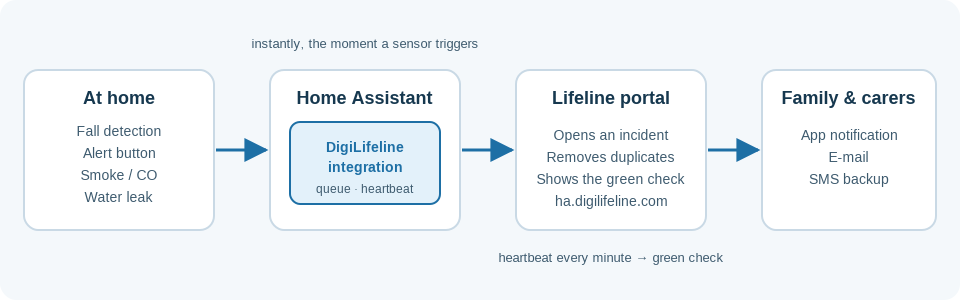
What happens when an alert triggers?

The route from sensor to notification for family and caregivers

Diagram: sensors, Home Assistant, the portal and family

When a critical sensor goes off, this happens:

  1. Home Assistant passes the alert straight on to the DigiLifeline integration.
  2. The integration puts the alert in a durable queue and sends it to the portal immediately.
  3. The portal ignores duplicate alerts, opens an incident and starts the emergency chain.
  4. The people you have chosen get a push notification in the app, an e-mail and, as a back-up, a text message.

What if the internet is down?

The alert stays in the queue, also after a restart of Home Assistant, and is sent again as soon as the connection is back. Late alerts are marked as such.

Where do you see an open incident?

  • In the app: the open incident is shown on the care recipient's status screen, and you can respond to it there.
  • In Home Assistant: binary_sensor.digital_lifeline_open_incident is on for as long as there is an open incident. The event digital_lifeline_incident fires when the list of incidents changes. This arrives within about a minute, which is handy for a siren or lights.

The web portal itself does not show a list of incidents.

"Sensor silent" and "Devices & connection"

What it means when a sensor is silent, the battery is almost empty or Home Assistant is unreachable

The green check and the heartbeat

What the green check in the portal means and why it can disappear

Powered by initdesk
On this page
  • What happens when an alert triggers?
  • What if the internet is down?
  • Where do you see an open incident?